Wedding schedule changes: telling your crew, and knowing they know
The ceremony moved from 5:00 PM to 5:30 PM. The bride's getting-ready suite changed floors. The venue now wants vendors at the service entrance on the north side. You told the lead. Did the second shooter get it? Did the assistant? On the day, your second shooter turns up at the main entrance at the old time, and spends twenty minutes finding the right room.
The direct answer: give each crew member their own start time, start location and venue access in writing, days before the wedding. When something changes, send the change to each person it affects, ask them to acknowledge it by a specific time, and follow up with anyone who hasn't. Decide before the day who crew call when something goes wrong, and give them that number. A change nobody has acknowledged is a change you can't count on.
Step 1: Give each person their own times, not the wedding's
Most "wrong place, wrong time" problems start with a single shared schedule. The second shooter reads the top line, which is the lead's start time, or the ceremony time, and plans around that.
For each person, write down:
- Their start time. Not the wedding's first time. Theirs.
- Their start location, as precisely as you can: "Groom's suite, room 214, second floor" beats "the hotel".
- Their part of the day, block by block.
- Their end time.
Our wedding photography timeline guide shows how to build a separate track for each person.
Step 2: Write down venue access once, for everyone
Venue details cause as many late arrivals as times do. For each venue, write down:
- The address, and which entrance vendors use.
- Where to park, and whether parking needs a pass or payment.
- Where to load gear in, and any times the loading area is closed.
- Rules about where photographers can stand or go.
- Who on site to ask for, if anyone.
If you work a venue often, keep these notes and reuse them. They rarely change, and when they do, you'll want everyone's copy to change too.
Step 3: Send it early, then confirm
Send each person their times and venue details well before the wedding, such as a week or two out. Ask them to confirm they have it. Then, a few days before, send a short reminder with the essentials: "Saturday, 2:30 PM, groom's suite, room 214. Park in lot B." That's often the message they'll look at on the way.
Step 4: When something changes, follow a routine
Changes are normal. Missing them isn't. Use the same steps every time:
- Decide who the change affects. A ceremony time change affects everyone. A change to the bride's getting-ready room may only affect the person covering that side.
- Update your one current schedule first, so the latest version is in one place. Mark older copies as replaced.
- Send the change to each affected person directly, in a separate message that says only what changed: "Change: your start time is now 3:00 PM, not 2:30 PM. Everything else is the same."
- Ask for an acknowledgment by a specific time. "Please confirm you've got this by Thursday 8 PM."
- Follow up with anyone who hasn't acknowledged by then, by phone if you need to.
- Tell the lead what changed and who has confirmed it.
Avoid sending a whole new schedule with the change buried in it. People compare the first lines, see nothing new, and move on.
Step 5: Changes on the day
On the day, changes come fast, and they come to the lead first. Agree the rule in advance:
- The lead on site decides most day-of changes: moving a portrait block, swapping who covers what.
- The lead tells the crew affected in person, or by a call. A message mid-ceremony won't be read in time.
- Anything that changes when someone arrives or leaves goes to the studio too, so the person watching the day knows.
Step 6: Decide who to call, and who calls whom
On the day, a crew member who is lost, late or stuck needs to know who to contact, and that person needs to answer. Before each wedding, decide and share:
- One number for problems on the day. Usually the lead's, or the studio manager's if the lead will be shooting.
- What counts as urgent: running late, can't find the entrance, gear failure, a medical issue, anything that leaves a part of the day uncovered.
- What the crew member should say: where they are, how late they'll be, what they need.
- Who tells whom: if the second shooter will be 20 minutes late, does the lead change the plan, or the studio? Decide so it doesn't happen twice or not at all.
An example: a ceremony that moved
The Hughes and Varga wedding is on Saturday, August 14, 2027, at the fictional Briarwood Inn. Two weeks out, the studio sends each crew member their own track: the lead at 1:30 PM in the bridal suite, the second shooter, Dev Anand, at 2:00 PM in the groom's suite, the assistant at 3:00 PM at the ceremony lawn. Everyone gets the same venue notes: vendor entrance on the north side, parking in the rear lot, load-in by the kitchen door.
On Tuesday, August 10, the planner moves the ceremony from 5:00 PM to 5:30 PM. The studio owner, Rosa Delgado, updates the schedule, then sends one message to each person: "Change: the ceremony is now 5:30 PM. Your start time is the same. Family portraits move 30 minutes later. Please confirm by Wednesday 8 PM." The lead and assistant confirm that evening. Dev doesn't.
On Wednesday at 8:15 PM, Rosa calls Dev, (609) 555-0172. He'd missed the message; he confirms on the call, and Rosa notes it. On the day, Dev parks in the rear lot, uses the north entrance, and is in the groom's suite at 1:55 PM. When the officiant runs ten minutes late, the lead tells the crew in person. Nobody needs to call the studio all day.
What to record so changes stick
- The current schedule, with each person's track, and when it last changed.
- For each change: what changed, who it affected, when you told them, and when each acknowledged it.
- For each venue: entrance, parking, load-in and rules, reused next time.
- The day-of contact for each wedding.
Questions studio owners ask about schedule changes
How far ahead should I send the crew their schedule?
Early enough that a change can still reach everyone, such as a week or two before, with a short reminder a few days before the wedding.
What if a crew member never acknowledges a change?
Call them. If you still can't reach them and the change matters, treat it like a crew member who has gone quiet: line up a backup and decide your cut-off. See what to do when a second shooter isn't responding.
My second shooter went to the wrong location. How do I stop that happening again?
Give each person their own start location, precisely, with the entrance and parking, and repeat it in the reminder a few days before. Most wrong-location mistakes come from a schedule that names the venue but not the room.
Should crew be in the client's group chat with the planner?
Most studios keep crew out of it. One person, usually the lead, talks to the planner, and passes on what affects the crew.
How Crew Confirm handles schedules and changes
Full disclosure: we make Crew Confirm. It was built inside a working wedding studio and runs that studio's weddings now.
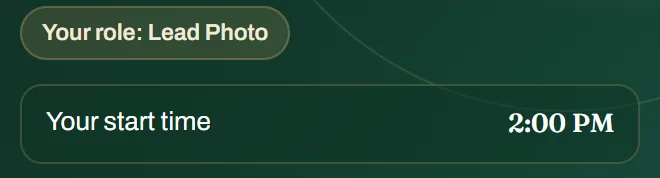
Each person sees their own track. You build the day in coverage blocks, starting from a preset and editing any row, and saving publishes it to the crew on that wedding. Each crew member sees their role and their own start time at the top of their wedding page, then their part of the day. Times show in the wedding's local time, with the zone labelled, and they can save the day's schedule as an image for their phone.
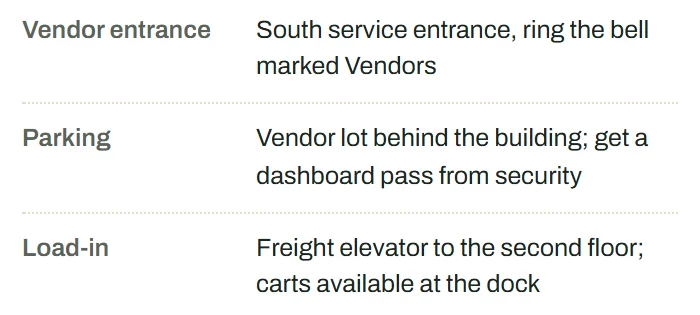
Venue details travel with the wedding. The vendor entrance, parking and load-in notes show on each crew member's phone. A venue you've written down once is in your venue library for the next wedding there.
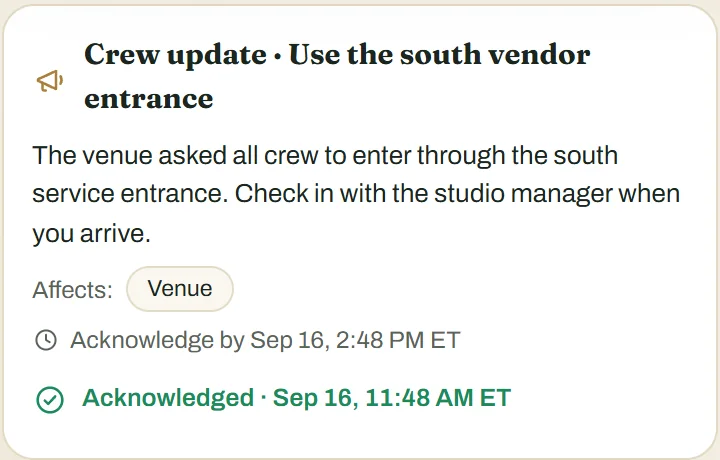
Changes ask for an acknowledgment. When something changes, you publish a crew update with a time to acknowledge it by. It goes to the crew confirmed on the wedding at that moment, and each person acknowledges it on their phone. On the wedding's day board you can tell who has acknowledged and who hasn't, by name, and anyone still outstanding after the deadline appears on your To-do list while the wedding is still ahead. When you publish an update, you can also choose to send it by text, once your studio's texting number is verified.
On the day. Crew tap arrived, running late or help, and the studio's board shows it. That makes it clear who is where, but it doesn't replace a phone call when something is urgent; give your crew the number to call.

See how it works, or our overview of managing several crews on one day.