How to manage a wedding photography team, from inquiry to wrap-up
Once your studio books more weddings than you can shoot yourself, the work changes. You're no longer just a photographer with help. You're responsible for every wedding, including the ones you're not at, and most of your week goes into keeping track of people: who is booked, who still owes you an answer, who has the schedule, who has sent their files.
The direct answer: manage a wedding photography team with one process that every wedding goes through, the same way, from the first inquiry to the last invoice. Each stage has a clear state (held, asked, confirmed, briefed, delivered, paid), one place where that state is written down, and one person responsible for moving it on. When something goes wrong, you look at the state, not your memory.
This guide lays out that process stage by stage, with what to decide, what to record, and what to do when a stage fails.
The stages every wedding goes through
| Stage | What it means | What to record |
|---|---|---|
| Inquiry | A couple is interested; nothing is booked | The date, and whether you're asking crew to hold it |
| Hold | Crew have agreed to keep the date for you, tentatively | Who is holding, since when, and what happens if they get another offer |
| Booked | The couple has signed | The crew you need, role by role |
| Asked | A crew member has a specific request for a role | The request, the deadline to answer |
| Confirmed | They said yes to that request | Their yes, and when |
| Briefed | They have their start time, schedule and venue details | What you sent, and that they've acknowledged changes |
| Wedding day | They're on site | Who has arrived, who is late, who needs help |
| Wrap-up | Files delivered, invoice in, payment recorded | Each of those, with dates |
Every step below moves a wedding from one row to the next. The point of writing it down is that anyone in your studio can look at a wedding and know which row it's in.
Stage 1: Inquiries and holds
When a couple is close to booking, you may want your best crew to keep the date free. That's a hold, and it's a favor: a held date may mean someone turns down paid work.
- Ask for a hold only on inquiries you expect to book.
- Say it's a hold, not a booking, and how long you expect it to last.
- Agree in advance what happens if they get another offer: they tell you, and you decide quickly.
- Release holds as soon as the couple decides either way.
We wrote a full guide to soft holds and confirmed bookings.
Stage 2: Booking the crew, one role at a time
When the couple signs, list the roles the wedding needs: lead photo, second photo, lead video, second video, assistant. Then fill each one.
- Ask one person per role, with the date, hours, start time, venue and pay in the ask.
- Give a deadline to answer. It tells them when you need to know, and tells you when to move on.
- Count a role as filled only when that person has said yes to that request. Not a reaction to a group message, not "should be fine".
- Confirm back with what they agreed to.
If someone doesn't answer by the deadline, move on. Our guide to a second shooter who isn't answering covers that in detail, and how to hire and confirm a second shooter covers finding people in the first place.
Stage 3: Know who does what
A team runs on clear jobs. Decide, and write down:
- Who leads each wedding. The lead makes the calls on the day. If it's not you, it's an associate, and they need more from you than a second shooter does. See associate photographer or second shooter.
- Who in the studio books crew. If both you and a studio manager can ask people, agree who handles which weddings, so nobody gets two requests for the same seat.
- Who answers crew questions before the day, and who answers them on the day.
- Who checks files and invoices afterward.
The most common team failure isn't a bad photographer. It's two people each assuming the other one sent the schedule.
Stage 4: Brief each person, not just the wedding
Your crew don't need the couple's whole day. Each of them needs their own:
- Their role and start time, and where they start.
- What they own in each part of the day.
- When their coverage ends.
- The venue: entrance, parking, load-in, rules.
- Who they report to on the day, with a phone number.
- The shot list and family list for their part.
Send it days before the wedding, not the night before. Our wedding photography timeline guide shows how to build a separate track for each person.
Stage 5: Handle changes so everyone knows
Weddings change: the ceremony moves, a getting-ready location changes, the couple adds a family photo. Each change has to reach every person it affects, and you need to know it has.
- Keep one current version of the schedule. Old versions should be clearly old.
- When something changes, tell the affected crew directly and ask them to acknowledge it by a set time.
- Follow up with anyone who hasn't acknowledged it by then.
More in our guide to communicating wedding schedule changes to your crew.
Stage 6: The wedding day
On the day, you want three things from each person: they've arrived, they're running late (and by how much), or they need help. If you're shooting a different wedding, someone in your studio needs to be watching for those, with authority to act.
Decide before the day who that is, and what they can decide without reaching you: calling a backup, changing who covers what, telling the planner about a delay.
Stage 7: Wrap-up: files, invoices, pay
The wedding isn't finished for your studio until every crew member has delivered their files, sent their invoice, and been paid.
- Say in your standing terms how and when files are delivered, and when invoices are due.
- Track each of the three separately for each person: files reported, invoice received, payment made.
- Follow up a set number of days after the wedding, not when you happen to remember.
Our guide to second shooter files and invoices covers the follow-up in detail.
Stage 8: Review the season
A few times a year, look back across your weddings:
- Who confirmed quickly, arrived on time, followed the brief and delivered on time? Book them first.
- Which weddings had a late scramble for crew, and why?
- Where did a change not reach someone?
- Which roles do you struggle to fill? Build your bench for those before the next busy season.
An example: a studio with two crews on most Saturdays
Lena Ashford runs a studio that books about forty weddings a year. She leads half of them; her associate, Marco Bell, leads the other half, and they often shoot on the same Saturday. Six freelancers fill second photo, video and assistant roles.
Every wedding goes through the same stages. When a couple is close, Lena asks the likely crew to hold the date. When the couple signs, she asks each crew member for their role with a 48-hour deadline, and marks the role confirmed only when they've said yes. Two weeks before each wedding, the crew get their own start time, schedule and venue notes. Marco owns the crew questions for the weddings he leads.
On Saturday, October 9, 2027, Lena is shooting at the fictional Linden Room and Marco is at Alder Brook Farm, also fictional. Her studio manager, Paul Ortiz, (973) 555-0118, watches both weddings' arrivals from the office and has authority to call the backup assistant. A week after the weddings, Paul checks which crew have delivered files and sent invoices, and follows up with the two who haven't.
Nothing here is clever. It's the same steps, every time, with one place to look.
What to record so the process holds
- One list of weddings, each with its stage.
- For each wedding, each role, who is on it, and their status: asked, confirmed, or still open.
- For each request: when you asked, the deadline, and the answer with its time.
- For each change: what changed, who needed to know, and who has acknowledged it.
- For each person after the wedding: files, invoice, payment.
Questions studio owners ask about managing a team
How do I keep quality consistent across leads?
Train before you trust: have new associates shoot as second for you first, then lead with you on site. Give every lead the same brief format and the same expectations about files. Review a full gallery from each lead every season, not just their highlights.
Should my freelancers be contractors or employees?
It depends on how you work with them and on the rules where you work, which differ from state to state. Ask a lawyer or an accountant who knows your state; don't decide it from a blog post, including this one.
What's the first thing to fix if everything feels chaotic?
Write down, for each upcoming wedding, each role and whether it is confirmed. Most chaos is not knowing that, and finding out one message at a time.
How far ahead should I book crew?
As soon as the couple signs, for the roles you're sure of. Peak-season Saturdays fill early, and the people you want most are the first to be booked.
How Crew Confirm runs this process
Full disclosure: we make Crew Confirm. It was built inside a working wedding studio and runs that studio's weddings now. It covers the crew side of every stage above, and sits beside the CRM you use for couples (we explain that split in keep your CRM).
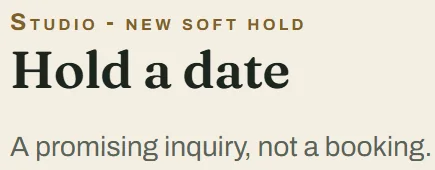
Holds and bookings. You can hold a date for a promising inquiry and ask crew to soft hold it. When the couple books, the same record becomes the wedding: a crew member who accepted the hold becomes confirmed, and a hold request still waiting for an answer becomes an ordinary booking request with a fresh deadline to answer.
Requests, one role at a time. Each request goes to one person for one role, with a deadline you choose. They accept or decline on their phone, and the wedding shows which roles are confirmed and which are still open.
Everything that needs you, in one list. The To-do list gathers what needs doing across your weddings, most urgent first: open roles, requests near their deadline, crew conflicts, missing start times or schedules, and after the wedding, overdue upload reports and missing invoices. The Crew Grid shows every upcoming wedding with one column per seat.

Schedules and changes. You publish each wedding's schedule to its crew, and each person sees their own role, start time and part of the day. When something changes, you publish a crew update with a time to acknowledge it by, and you can tell who has and who hasn't.
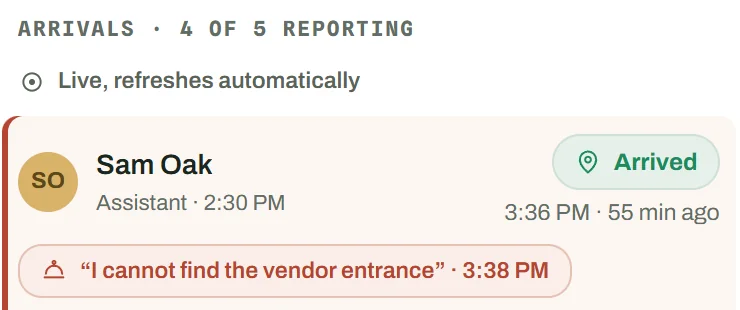
The day and the week after. On the day, crew tap arrived, running late or help, and the studio's board shows it. Afterward, crew report their file upload and send their invoice in the app, and you record payments for your books. It doesn't move money.
You can add a studio manager account so someone else can run the board when you're shooting. It isn't a marketplace and it won't find you new crew: it runs the crew you already have, and your crew list comes in from a spreadsheet file. See how it works.