Keep your CRM. It runs your clients. Crew Confirm runs your wedding crew.
Crew Confirm doesn't replace the CRM you sell weddings with. It sits beside it and runs the people you hire: who's booked for which wedding, what changed, who has arrived, and what they've invoiced.
Your CRM was built for the couple. Crew Confirm was built for the wedding crew.
A studio CRM handles the client side of a wedding: the inquiry, the contract, the client's invoice, the questionnaire, and for some, the gallery. None of that changes. What moves to Crew Confirm is the part that lives today in group chats, texts and a spreadsheet: the freelancers you book, the plan you send them, the day itself, and the week after.
| Stays in your CRM | Moves to Crew Confirm |
|---|---|
| Inquiries and leads | Your crew list: names, roles, phone numbers |
| Proposals, quotes and packages | Booking requests, one seat at a time, with a deadline to answer |
| Contracts with your couples | Who said yes, and when |
| Invoices and payments from your couples | Soft holds on a date before the couple books |
| Questionnaires and client emails | The day's schedule, coverage blocks and start times, on each crew member's phone |
| Galleries and photo delivery, if your CRM or gallery tool does it | Venue details for the crew: entrance, parking, load-in |
| Anything your couple sees | The shot list and the family photo list |
| On the day: who has arrived, who is running late, who needs help | |
| After: who delivered files, who has invoiced, what you've recorded as paid |

How one wedding moves between your CRM and Crew Confirm
- A couple books, in your CRM. Contract, retainer, questionnaire: all where they are today.
- You add the wedding to Crew Confirm. The date and the venue are all it needs to start; the couple's names can wait. If you've worked the venue before, its entrance, parking and load-in come from your venue library.
- You ask your wedding crew, one seat at a time. Each request has a deadline. It reaches the crew member by text or WhatsApp, whichever they chose, once your studio's texting number is verified, and they accept with one tap. You can see which seats are filled and which are still open.
- You send the plan once. The schedule, the shot list and the family list are on their phones. When something changes, you change it once and re-publish, and you see who has acknowledged it. (How to build that schedule with a track for each person is in our wedding photography timeline.)
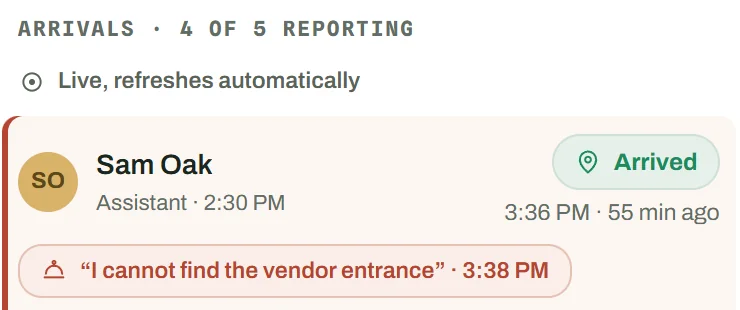
- On the day, you watch one board. Arrived, running late, needs help, from each crew member's phone.
- After the wedding, you close out the crew side. Who delivered files, who has invoiced, and the payments you've recorded. Your couple's final invoice and their gallery stay in your CRM or gallery tool, as now.


The full walk-through is on how it works.
What you'll type twice
There's no live connection between Crew Confirm and any CRM today: nothing syncs on its own. To start, you can bring your booked weddings in from a spreadsheet file, including a CSV exported from your CRM. You see how its columns map before anything is saved, and the couple's email and phone are left out on purpose. After that, each new booking goes in twice: once in your CRM, once in Crew Confirm.
We kept that second entry short. A date and a venue are enough to start booking crew, and a venue you've written down once is there for the next wedding. Your crew list comes in from a spreadsheet file the same way.

What Crew Confirm doesn't do (on purpose)
- No client contracts. It doesn't write, send or sign contracts with couples. That's your CRM, or your lawyer's template.
- No proposals, client invoices or client payments. What couples pay you never comes near it.
- No galleries. It doesn't store or deliver photos or video to couples. It keeps track of which crew members have handed in their files.
- No messages to your couples. It keeps the couple's names, not their phone numbers, emails or contracts, so it has no way to contact them, and they never sign in.
- No payments to crew. It doesn't move money. You record what you paid; your bank transfer, payment app or check still pays people.
- No payroll, no tax forms. It doesn't run payroll or prepare 1099s. The yearly statement a crew member can download is a record for their own bookkeeping, not a tax form. Ask your accountant what you need to file.
- Not a marketplace. It won't find you strangers for Saturday. It runs the crew you already have.
- No app store. It's a web app. Crew open a link in their phone's browser and can add it to their home screen.
- No integration with any CRM, today.
We'd rather do the crew side well than do your CRM's job badly.


Who it's for
Crew Confirm earns its place the moment you run two wedding crews at once. If you shoot every wedding yourself, your CRM is probably all the software you need. If you're building your bench for that second crew, start with how to hire and confirm a wedding second shooter. If someone else will lead that second wedding, read what an associate photographer needs from you, and for the day itself, how to manage multiple wedding crews on the same day.
Questions studio owners ask about Crew Confirm and their CRM
Do I have to switch CRMs?
No. Keep the one you have. Crew Confirm doesn't do your CRM's job, and your CRM doesn't need to change for it.
Does Crew Confirm connect to my CRM?
No. There's no integration with any CRM today, so nothing passes between them on its own. You can bring weddings in from a CSV your CRM exports; after that, you add each new wedding yourself, and a date and a venue are enough to start.
Can I bring my weddings over from my CRM?
Yes, from a file. Export your weddings from your CRM as a CSV, or fill in our template, and Crew Confirm shows how each column maps before anything is saved. Nothing syncs after that, and the couple's email and phone are not imported. Your crew list comes in the same way.
Will my couples see Crew Confirm?
No. It's for your studio team and your crew. Couples don't sign in, and Crew Confirm holds no contact details for them, so it never messages them.
My CRM already lists who's shooting each wedding. Why add this?
If that list is all you need, keep it. Crew Confirm is the crew member's side as well as yours: the request they accept on their phone, the schedule and venue details they carry, the arrived, late and help buttons on the day, and their invoices after. A name on a job in your CRM doesn't do those things for them.
I already pay my second shooters through another tool.
Keep doing that. Crew Confirm doesn't move money. It tracks what each crew member has invoiced, and you record what you've paid, for the books. The two sit side by side.
Can I get my data out?
Yes. You can export your crew list and crew invoices as CSV files, and each crew member can download their statements as PDF or CSV. If you cancel, your studio stays viewable and exportable (read-only), and nothing is deleted.
What does it cost?
Plans go by how many active crew you book. Starter is $49 a month for up to 5 active crew, Team is $89 a month for up to 15 active crew, and Studio is $149 a month with unlimited crew. A crew member counts while they're booked or asked, in the last 12 months or upcoming. Everyone else on your list is free. Owner, manager and editor accounts are free, and crew never pay. You pay $9 for your first 14 days; then the plan you chose renews monthly unless you cancel. Details are in the pricing section, and more answers are in the FAQ.
When does texting start?
Crew get requests by text or WhatsApp, whichever they chose, once your studio's texting number is verified, which usually takes 3 to 5 business days. Until then, requests show in the crew app.
See it beside your CRM
If you run more than one wedding crew on a Saturday, start your studio ($9 for your first 14 days, then your plan renews monthly unless you cancel) and put one booked wedding in it, or book fifteen minutes and we'll show you how Crew Confirm sits beside your CRM.